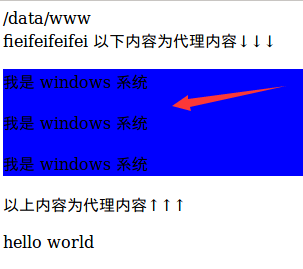
Apache 配置.. httpd.conf
Apache 配置.. httpd.conf
Apache 配置.. httpd.conf
配置
1
2
3
4
5
6
7
8
9
10
11
12
13
14
15
16
17
18
19
20
21
22
23
24
25
26
27
28
29
30
31
32
| <VirtualHost *:80>
DocumentRoot "E:/selfweb/git_dev/test/"
ServerName fei.apache.test
ServerAlias fei.apache.test
<Directory />
Options +Indexes +FollowSymLinks +ExecCGI
AllowOverride All
DirectoryIndex index.html index.php
Order allow,deny
Allow from all
Require all granted
</Directory>
</VirtualHost>
|
配置ssl,支持https 01
1
2
3
4
5
6
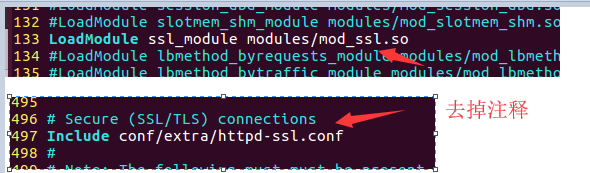
| 编辑Apache根目录下 conf/httpd.conf 找到
LoadModule ssl_module modules/mod_ssl.so
LoadModule socache_shmcb_module modules/mod_socache_shmcb.so
和
Include conf/extra/httpd-ssl.conf
去掉这3行前面的注释
|
配置ssl,支持https 02-1
1
2
3
4
5
6
7
8
9
10
11
12
13
14
15
16
17
18
19
20
21
22
23
24
25
26
27
28
29
30
31
32
33
34
35
36
37
38
39
40
41
42
43
44
45
46
47
| 修改 httpd-ssl.conf 文件, a_public.crt a.key a_chain.crt 换成你对应的证书名字
vim /data/server/apache/conf/extra/httpd-ssl.conf
内容如下:
<VirtualHost _default_:443>
SSLProtocol all -SSLv2 -SSLv3
SSLCipherSuite HIGH:!RC4:!MD5:!aNULL:!eNULL:!NULL:!DH:!EDH:!EXP:+MEDIUM
SSLHonorCipherOrder on
SSLCertificateFile /data/server/apache/conf/extra/cert/a_public.crt
SSLCertificateKeyFile /data/server/apache/conf/extra/cert/a.key
SSLCertificateChainFile /data/server/apache/conf/extra/cert/a_chain.crt
ServerName 你的域名:443
DocumentRoot "/data/web/web01/"
<Directory /data/web/web01/>
Options FollowSymlinks
DirectoryIndex index.php
Allow from all
AllowOverride All
Require all granted
</Directory>
SSLEngine on
<FilesMatch "\.(cgi|shtml|phtml|php)$">
SSLOptions +StdEnvVars
</FilesMatch>
<Directory "/data/server/apache/cgi-bin">
SSLOptions +StdEnvVars
</Directory>
CustomLog "/data/server/apache/logs/ssl_request_log" \
"%t %h %{SSL_PROTOCOL}x %{SSL_CIPHER}x \"%r\" %b"
</VirtualHost>
vim /data/server/apache/conf/self_vhosts/vhost.conf
<VirtualHost *:80>
ServerName 你的域名
DocumentRoot "/data/web/web01/"
<Directory /data/web/web01/>
Options FollowSymlinks
DirectoryIndex index.php
Allow from all
AllowOverride All
Require all granted
</Directory>
</VirtualHost>
|
配置ssl,支持https 02-2
1
2
3
4
5
6
7
8
9
10
11
12
13
14
15
16
17
18
19
20
21
22
23
24
25
26
27
28
29
30
31
32
33
34
35
36
37
38
39
40
41
42
43
44
45
46
47
48
49
| 编辑Apache根目录下 conf/httpd.conf 找到
LoadModule ssl_module modules/mod_ssl.so
和
Include conf/extra/httpd-ssl.conf
去掉这2行前面的注释
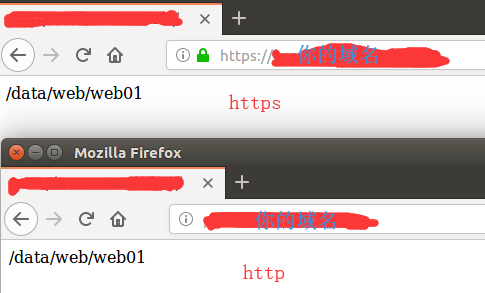
这个操作完成后可以修改 vim /data/server/apache/conf/self_vhosts/vhost.conf 文件
<VirtualHost *:80>
ServerName 你的域名
DocumentRoot "/data/web/web01/"
<Directory /data/web/web01/>
Options FollowSymlinks
DirectoryIndex index.php
Allow from all
AllowOverride All
Require all granted
</Directory>
</VirtualHost>
<VirtualHost _default_:443>
SSLProtocol all -SSLv2 -SSLv3
SSLCipherSuite HIGH:!RC4:!MD5:!aNULL:!eNULL:!NULL:!DH:!EDH:!EXP:+MEDIUM
SSLHonorCipherOrder on
SSLCertificateFile /data/server/apache/conf/extra/cert/a_public.crt
SSLCertificateKeyFile /data/server/apache/conf/extra/cert/a.key
SSLCertificateChainFile /data/server/apache/conf/extra/cert/a_chain.crt
ServerName 你的域名:443
DocumentRoot "/data/web/web01/"
<Directory /data/web/web01/>
Options FollowSymlinks
DirectoryIndex index.php
Allow from all
AllowOverride All
Require all granted
</Directory>
SSLEngine on
<FilesMatch "\.(cgi|shtml|phtml|php)$">
SSLOptions +StdEnvVars
</FilesMatch>
<Directory "/data/server/apache/cgi-bin">
SSLOptions +StdEnvVars
</Directory>
CustomLog "/data/server/apache/logs/ssl_request_log" \
"%t %h %{SSL_PROTOCOL}x %{SSL_CIPHER}x \"%r\" %b"
</VirtualHost>
|
apache 80 跳转到 443
1
2
3
4
5
6
7
8
9
10
11
| <VirtualHost *:80>
ServerName your.domain.com
RewriteEngine on
RewriteCond %{SERVER_PORT} !^443$
RewriteRule ^/?(.*)$ https://%{SERVER_NAME}/$1 [L,R]
RewriteRule ^.*$ https://%{SERVER_NAME}%{REQUEST_URI} [L,R]
</VirtualHost>
|
Apache 正向代理
1
2
3
4
5
6
7
8
9
10
11
12
13
14
15
16
17
18
19
| <virtualHost *:80>
ServerName 127.0.0.1:80
DocumentRoot /usr/local/apache2/htdocs/www
<Directory /usr/local/apache2/htdocs/www>
Options FollowSymLinks
AllowOverride All
Order allow,deny
Allow from all
</Directory>
ProxyRequests Off
<Proxy *>
Order deny,allow
Allow from all
</Proxy>
ProxyPass /fei1/ http://192.168.1.151/
ProxyPassReverse /fei1/ http://192.168.1.151/
</VirtualHost>
|