Apache 安装
apache 安装 1)官方地址: http://httpd.apache.org/docs/2.4/install.html
2)centos系统中可以: 1 yum install -y gcc gcc-c++ autoconf libjpeg libjpeg-devel libpng libpng-devel freetype freetype-devel libpng libpng-devel libxml2 libxml2-devel zlib zlib -devel glibc glibc-devel glib2 glib2-devel bzip2 bzip2 -devel ncurses curl openssl-devel gdbm-devel db4-devel libXpm-devel libX11-devel gd-devel gmp-devel readline-devel libxslt-devel expat-devel xmlrpc-c xmlrpc-c-devel
3),下载好源码 1 2 3 4 wget https://mi rrors.tuna.tsinghua.edu.cn/apache/ /httpd/ httpd-2.4 .37 .tar.gz wget https://mi rrors.cnnic.cn/apache/ /apr/ apr-1.6 .5 .tar.gz wget http://mi rror.bit.edu.cn/apache/ /apr/ apr-util-1.6 .1 .tar.gz wget http:// jaist.dl.sourceforge.net/project/ pcre/pcre/ 8.36 /pcre-8.36.tar.gz
4).安装 1 2 3 4 5 6 7 8 9 10 11 12 13 14 15 16 17 18 19 20 21 22 23 24 25 26 27 28 29 30 31 32 33 34 35 36 37 38 39 40 41 42 43 44 45 46 47 48 49 50 51 52 53 54 55 56 57 58 59 60 61 62 63 64 65 centos中安装pcre: yum install -y pcre pcre-devel ubuntu中安装pcre: apt-get install libpcre3 libpcre3-dev #安装过程中缺少依赖自行安装,我的pcre已经用apt安装好了 #groupadd deployer useradd -g apache apache #tar -zxvf apr-1.6 .5 .tar.gz -C /data /server /apache_component #tar -zxvf apr-util-1.6 .1 .tar.gz -C /data /server /apache_component #tar -zxvf pcre-8.36 .tar.gz -C /data /server /apache_component #tar -zxvf httpd-2.4 .37 .tar.gz -C /data /server /apache_component tar -zxvf apr-1.6 .5 .tar.gz cd apr-1.6 .5 ./configure make make install tar -zxvf apr-util-1.6 .1 .tar.gz cd apr-util-1.6 .1 ./configure \ make make install ##centos中少库 expat-devel ##ubuntu中缺少 apt-get install libexpat-dev tar -zxvf httpd-2.4 .37 .tar.gz cd httpd-2.4 .37 ./configure \ make make install ##到这里已经安装完毕,下面配置Apache vim httpd.conf #修改配置 ServerName www.test.com:80 ##Apache常用命令 /data /server /apache/bin /apachectl -v #查看 Apache 版本 /data /server /apache/bin /apachectl -V #大写V 查看 Apache 版本,安装路径等其他信息 /data /server /apache/bin /apachectl -k start #参数k发送信号 /data /server /apache/bin /apachectl -k stop /data /server /apache/bin /apachectl restart /data /server /apache/bin /apachectl configtest #检查配置文件是否正确 /data /server /apache/bin /apachectl -t #检查配置文件是否正确 /data /server /apache/bin /httpd -t #检查配置文件是否正确 /data /server /apache/bin /apachectl -S #大写S 显示已解析的vhost设置 /data /server /apache/bin /apachectl -help cat /data /server /apache/build /config.nice #查看apache编译参数 ps -aux | grep httpd # 查看 apache 状态 windows 中命令 ./httpd.exe -t #查看配置文件是否正确 <Directory /data /www> Deny from all #403 拒绝访问 #ErrorDocument 404 /test /404. html #404 重定向 #ErrorDocument 404 "This is 404 page" </Directory >
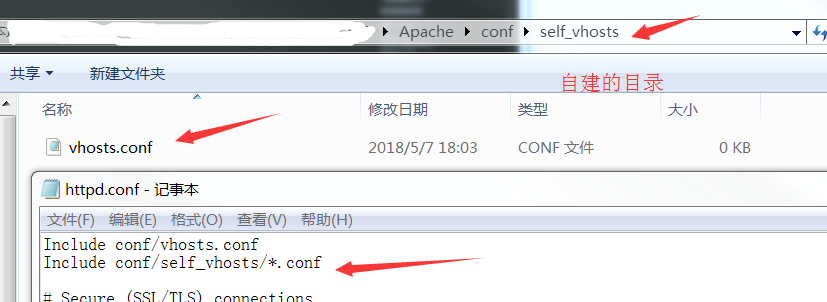
5)自定义配置文件 1 Include conf/self_vhosts/*.conf
让普通用户可以启apache 1 2 3 4 cd /data/server/apache/binchown root httpd #chown root:www httpdchmod u+s httpd
强制 Apache 返回一个404状态码 1 2 3 4 5 6 7 Redirect 404 / #访问根目录显示404 Redirect 500 / #访问根目录显示500 <Directory /data/www> Deny from all #403 拒绝访问 #ErrorDocument 404 /test/404. html #404 重定向 #ErrorDocument 404 "This is 404 page" #400 显示错误字符串 </Directory>
Apache 解析php 1 2 3 4 5 6 7 8 9 10 11 12 13 14 15 16 17 18 19 20 21 22 23 24 25 26 27 28 29 30 31 32 33 34 35 36 '--with-apxs2=/usr/local/apache/bin/apxs' #让Apache支持PHP /data/server/php7/bin/php -i | grep configure 在Apache的conf中添加自己的文件路径; Include conf/self_vhosts/*.conf <VirtualHost *:80> ServerName DocumentRoot ProxyRequests Off ProxyPassMatch ^/(.*\.php(/.*)?)$ fcgi://127.0.0.1:9000/data/www/$1 <Directory /data/www> Options DirectoryIndex index.php AllowOverride All Require all granted </Directory> </VirtualHost> <FilesMatch \.php$> SetHandler "proxy:fcgi://127.0.0.1:9000" </FilesMatch>
使用ip访问,骚气操作01 1 2 3 4 5 6 7 8 9 10 11 12 13 14 15 16 17 <IfModule alias_module> ProxyRequests Off ProxyPassMatch ^/(.*\.php(/.*)?)$ fcgi://127.0.0.1:9000/data/www/test/public/$1 Alias /test "/data/www/test/public" #使用别名访问 </IfModule> <Directory /data/www/test/public> Options DirectoryIndex index.php Allow all AllowOverride All Require all granted </Directory>
使用ip访问,骚气操作01 1 2 3 4 5 6 7 8 9 10 11 12 13 14 15 16 17 18 19 20 21 在 conf/httpd.conf 文件中添加 <FilesMatch \.php$> SetHandler "proxy:fcgi://127.0.0.1:9000" </FilesMatch> <Directory "/data/www/web/fsnh/api/trunk/public"> Options AllowOverride all Require all granted </Directory> Alias /aaa "/data/www/cfsh/CFSH/public" <Directory "/data/www/cfsh/CFSH/public"> Options AllowOverride all Require all granted </Directory>