场景: windows7 phpstudy2016 php7.3 nginx, 使用curl file_get_content本地项目之间互相访问一直超时或者失败
场景再现
1
2
3
4
5
6
7
8
9
10
11
12
13
14
15
| demo.test.com:80
文件 E:\selfweb\git_dev\test\index.php 内容如下:
<?php
$file = file_get_contents("http://demo.test.com:80/index2.php");
print_r($file);
echo "<br> php-cgi.exe -b demo.test.com:9001 -c php.ini";
-------------
目录 E:\selfweb\git_dev\test\index2.php 内容如下
<?php
echo "我是 index2.php 从我这里拿数据";
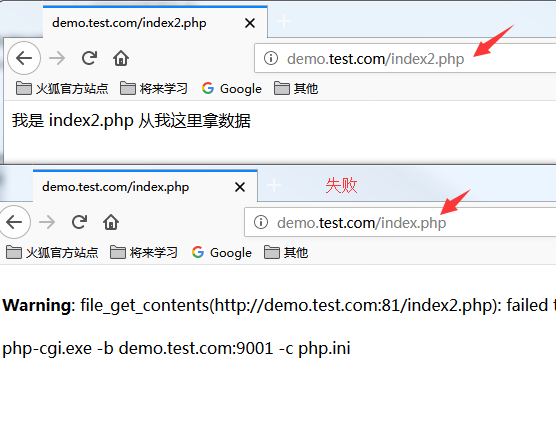
访问 http:
访问 http:
|
解决办法
1
2
3
4
5
6
7
8
9
10
11
12
13
14
15
16
17
18
19
20
21
22
23
24
25
26
27
28
29
30
31
32
33
34
35
36
37
38
39
40
41
42
43
|
server {
listen 80;
server_name demo.test.com 192.168.1.151;
charset utf-8;
root E:/selfweb/git_dev/test/;
index index.php;
location ~ .+\.php($|/) {
fastcgi_pass 127.0.0.1:9000;
fastcgi_index index.php;
include fastcgi.conf;
}
}
server {
listen 81;
server_name demo.test.com;
charset utf-8;
root E:/selfweb/git_dev/test/;
index index.php;
location ~ .+\.php($|/) {
fastcgi_pass 127.0.0.1:9001;
fastcgi_index index.php;
include fastcgi.conf;
}
}
php-cgi.exe -b demo.test.com:9001 -c php.ini
文件 E:\selfweb\git_dev\test\index.php 中端口内容如下:
<?php
$file = file_get_contents("http://demo.test.com:81/index2.php");
print_r($file);
echo "<br> php-cgi.exe -b demo.test.com:9001 -c php.ini";
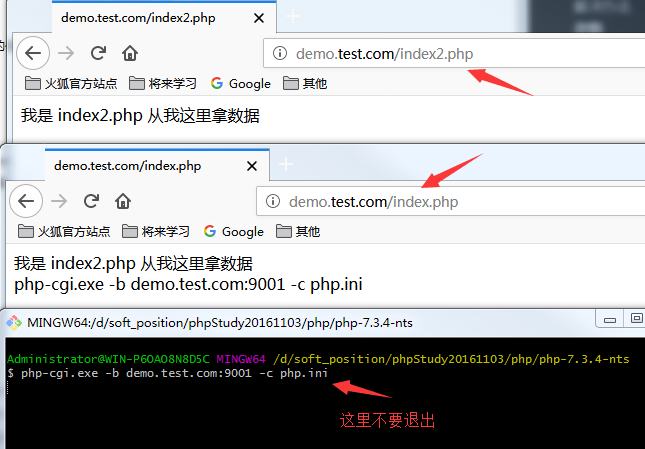
访问 http://demo.test.com:80/index2.php #成功
访问 http://demo.test.com:80/index.php #成功
|
编写bat 脚本
1
2
3
|
set php_nts=D:\soft_position\phpStudy20161103\php\php-7.3.4-nts
%php_nts%\php-cgi.exe -b demo.test.com:9001 -c %php_nts%\php.ini
|
多个版本的nginx
在phpstudy_pro最新版本中开始支持安装2个nginx版本; 在低版本中很多是不支持的
